Background
Notes attached to a book's text are a useful device that comes to us from the world of print - used when we want to clarify a concept or a particular word, to expand on it, or to interpret it.
Usually this is done as follows: next to the word or concept in the text there appears a marker or a superscript number, while next to the note itself we place that same number in order to link the note to its location.
In the world of print there were several kinds of such notes:
Side notes were indeed written in the margin, alongside the page, with a visual or numeric marker for each note, so that the reader could glance to the side, read the note, and quickly return to their place in the text.
Footnotes are written at the bottom of the page, below a line separating the body text from the notes.
End notes are written at the end of the chapter, or in a separate notes section such as a bibliography at the end of the book.
Because you have to page all the way to the end of the chapter or the book, the marking convention here is a different number for each note - one the reader can hold in memory for a few moments and then find in the list of notes. Here too, of course, the common practice was to number the note locations in superscript at the various points in the book's text, and to number the notes in the closing section.
When writing documents or a book in the Word document editor, there are tools and methods for quickly and neatly adding these various notes. You can read more about that here.
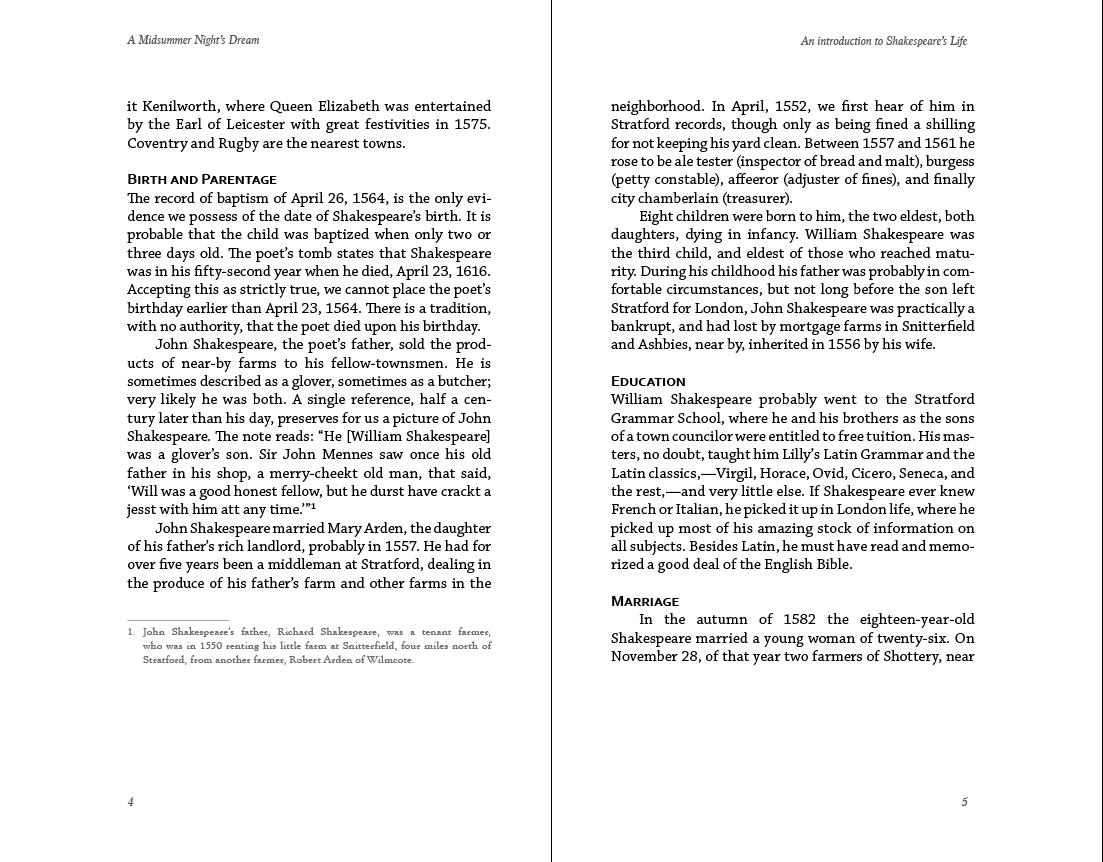
Notes in the early days
Like many other capabilities that were converted to the digital world, notes too had to find their place in the digital ePub format.
Since a reading device has no wide "wasted" margin alongside the screen, we have nowhere to put side notes if we need them.
We could add a separate paragraph in a different style, in the right spot, but that of course would disrupt the user's reading flow - exactly what the side note was never meant to do in the first place.
For the same reason, and because there is no fixed, defined "page," it is of course impossible to place a note "at the bottom of the page."
The idea of end notes immediately looks better suited to a digital reading format - where you can tap a link (the note's number) and jump straight to the end of the chapter or to another chapter to view the note.
But how do you get back from that spot at the end of the chapter or in another chapter? After all, we did not page our way there, and we certainly do not want to page all the way back...
The accepted solution is simply to place an additional link, right next to the note, that returns us to the original location we came from.
This solution, known as the "round-trip" note, was very common in the early days of digital book production; in Israel too, "Mendele Digital Books" was one of the pioneers of the method, and thousands of books here contain notes built this way.
For an example of a link to a note at the bottom of the page and back to this point - click here.

Interactivity and ePub3
With the arrival of advanced standards such as ePub3, the definitions for the book's structure and its constituent files also brought more orderly definitions for notes - in order to support the ability of the various apps to display notes.
To support books that had already been created with the "round-trip" method, it was necessary to preserve those same links but also to allow apps to display the note over the text - without an unwanted jump between pages or chapters.
The industry decided to upgrade and standardize text notes as follows:
- The book's producer decides whether to place the notes at the end of the chapter or in a completely separate chapter. The preference is at the end of the chapter and not in a separate chapter (to improve the efficiency of reading systems).
- The link to the note (an
atag) will use theepub:typeattribute with the value noteref. - The value of the note link (
href) should follow the structurepagename.xhtml#anchorID:pagename.xhtmlis the name of the current file/chapter, which also contains the note's content.anchorIDis the identifier of the object that contains the note's content.
Preference is for a value of#anchorIDonly - for a link to a note located in the same chapter!
- The note's content should be wrapped in a tag (preferably an
asidetag) that includes theepub:typeattribute with the value footnote. - A return link back to the source of the note link - if one exists - should be contained within the note's content itself.
These definitions make it possible to support old "round-trip" links, but they also allow reading systems (reading apps) to display the note's content in a pop-up over the note link's location - thereby letting the reader continue reading without interruption.
Excellent links for further reading and information can be found here:
- The pagetoscreen site
- The publisha site
- KOBO specifications
- gitden specifications
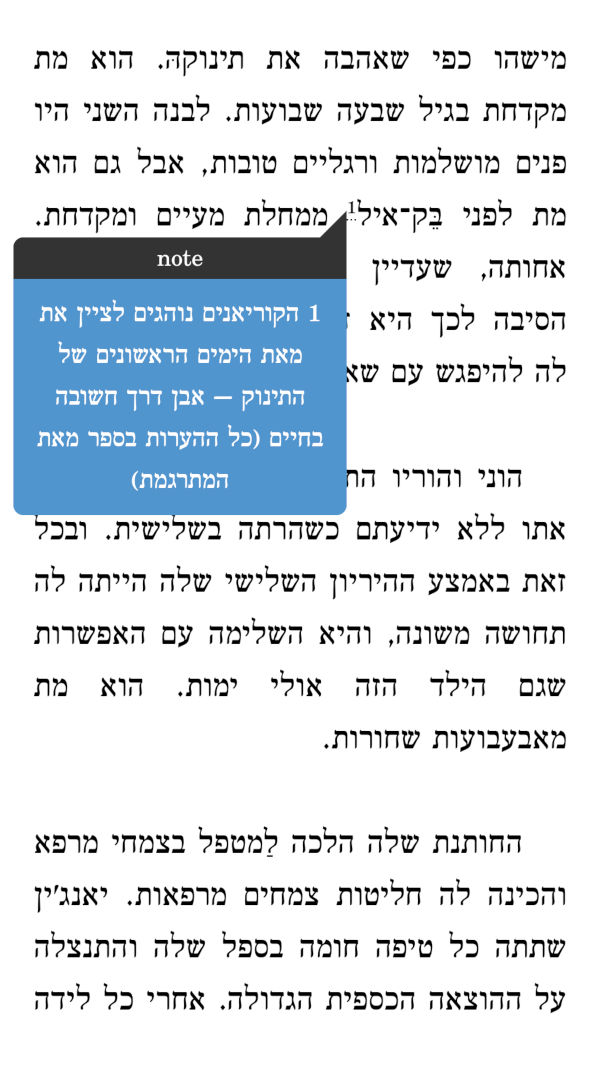
Why aside?
Using the aside tag for note content is a convention, not part of the standard. In truth, the aside tag was intended for secondary content presented as part of the text, a kind of parenthetical aside that is not written separately from the main text. Some even argue on these grounds that this tag should not be used for notes at all.
The reality is that it is indeed common in the industry today for note content to use this tag, and there are even reading systems that, because of this, have configured the app itself so that the content of an aside tag is not displayed on screen at all - appearing in a pop-up only when the note link is tapped. This of course prevents the tag's original purpose, and even prevents displaying notes at the end of the chapter to support the old "round-trip" method.
Our recommendation to book producers: do not remove the display of the aside tag in the book's own styling - this way we support both a dynamic pop-up and the ability to use a return link from notes at the end of the chapter.
If you have ultimately decided to create a note that appears only in a pop-up, and you have deliberately hidden your aside tag - then you should also remove the return link entirely! That way you will at least end up with a clean, tidy footnote.
Future changes?
When defining attributes in the epub:type structure to use various values in the XHTML code for building a digital book, an incompatibility arose with other standards - the most important of which is the CSS standard, the standard governing the structure of style definitions.
A situation was created in which reading apps that rely on style and search definitions are technically unable to use attributes containing symbols such as ":" as it appears in epub:type.
There are calls to change these EPUB standards, or alternatively to update the CSS standard, and the bet is that the EPUB standard will have to fall in line with the CSS standard.
The expectation is that the attribute structure will move to using "-" instead of ":", and therefore the epub:type attribute will become epub-type.
InDesign
How can you wrap up a technical topic without addressing the mess that InDesign creates when preparing books in Hebrew?
Below is note-content code, one that was created by and exported from InDesign:
<div id="footnote-001" class="_idFootnote" epub:type="footnote">
<p class="footnote"><a class="_idFootnoteAnchor _idGenColorInherit" href="#footnote-001-backlink">3</a> <span lang="en-US" xml:lang="en-US">שמלה</span><span lang="en-US" xml:lang="en-US"> </span><span lang="en-US" xml:lang="en-US">קוריאנית</span><span lang="en-US" xml:lang="en-US"> </span><span lang="en-US" xml:lang="en-US">מסורתית</span></p>
</div>
Admittedly, you can spot a structure similar to what we wanted - the content tag is defined with a suitable attribute, it wraps the content as well as the return link. Everything is seemingly correct - and yet so incorrect and cumbersome.
Note that the note's content is just 3 words, while each word is wrapped in separate tags, which for some reason are also defined in the wrong language. On top of that, the convention of using an aside tag is ignored, and so leading reading apps will not display the content in a pop-up.
This code might work, but it will place a needless load on the reading app whose only job was to display 3 words...
As always - do not count on InDesign to output clean, standards-compliant code. Preparing footnotes in Hebrew requires manual work, or the use of additional tools, in order to clean up and build the code properly.
A sample round-trip note
Here is an example of a "round-trip" note:
"Welcome to the note!" And now go back to the place you came from by clicking this link.