The stage of producing a book in digital format is an important and critical step whose significance many authors and publishers underestimate.
Many publishers treat this stage as a "conversion to a digital book" rather than as a production stage in its own right - which highlights the lack of importance and understanding they attach to the process.
Background
The global standard format for a digital book file is the EPUB3 format.
This is a file that contains all of the book's content: text, tables, footnotes, images, fonts, style definitions, and more. The file is built in a format agreed upon by all the companies in the industry, and it is essentially a kind of bundle of HTML pages intended for display in a reading app, where the information is organized much like a collection of small websites - a single page for each chapter separately.
But of course, unlike websites scattered across the network, the digital book contains all the information needed to display it - within the book itself. This is a fundamental definition that makes it possible to display the book similarly across different reading apps, but it also prevents the kind of compatibility and capabilities familiar from websites.
In general, the display capabilities and style definitions for a digital book are significantly reduced and limited compared with the styling and display capabilities of websites shown in a browser.
Why EPUB3 specifically?
When choosing a suitable format for a digital book, it was necessary to choose a format that would serve first and foremost to display text optimally. This while ignoring constraints such as the size of the user's screen, the device on which it would be shown, and so on. There was a need to design a format in advance that could display text independently of the final medium on which the text would be shown.
These requirements actually match the requirements of a website that displays text in a browser - where the size of the text or its length is immaterial; it simply scrolls down and down, all the way to its end, adapting itself to the width of the screen the user is viewing. Hence the strong similarity between the structure of web pages and chapters in a digital book.
Most books indeed need to display text and a few images, which suits a "continuous" display in which the content scrolls down as far as needed. This lets the user control the size of the displayed text as they please. This sub-format is called REFLOWABLE (one that can flow automatically).
But sometimes another format is needed, one that preserves the relationship between the positions of the various content objects in the book - for example, in a children's book with many images, where the position of the text relative to the images and the relative position of the images to one another matter. This sub-format is called FIXED-LAYOUT, or FXL for short (fixed display).
The digital book production process
Usually, the production process begins with the materials that already exist at the publishing house - those that were used in the production process to prepare the book for print.
The leading software in the print book production industry is Adobe's InDesign.
This software has led the design and production industry for books intended for print for many years - and that is indeed its specialty. Page layout, crop marks, print color compatibility, cover preparation, offset printing, and more. It is impressive software with a great deal of accumulated knowledge in the field of... print.
With the rapid shift to the digital world, Adobe rushed (too much) to develop add-ons and upgrades for the print software in order to support creating digital books by "exporting" to that format from within the software. But when it comes to the result, this attempt has failed. For years the software has failed to "turn" the information fed into it for print preparation into a valid, stable digital format. Apparently, knowledge in the field of print does not really help in the field of digital reading and production. On top of that, only in recent versions have they begun to support the issues that accompany Hebrew-language content, but of course the road to a valid process is still long and tiring.
In fact, it seems the day will never come when material prepared for print will magically and automatically move over to valid digital content intended for viewing on end devices by users who choose their screen size, text size, and the rest of their reading preferences.
A great many decisions related to redesign, size changes, colors, display preferences, and the capabilities of the EPUB3 format simply cannot be performed fully automatically by software.
The process of taking content from the world of print into the digital world is the production process that is required, one entrusted to digital professionals, developers, and designers who "speak" the language of the digital book, and not the language of print. This is the digital production process.
"...Many publishers, and even "professional" digital book producers, simply export the book's content directly from InDesign and thereby produce a low-quality digital book, usually with an invalid structure. In doing so they directly harm the author, the rights holders, and the readers themselves..."
- Head of the production studio, Sifriapp
Remember: the digital book is your asset for the future!
How do we identify a book with low production quality?
It is very easy to identify a low-quality book that was exported directly from InDesign, without oversight and production by professional digital experts. In this post we will go over several examples.

Checking the EPUB3 standard
Let's start by checking the digital book's validity using a compatibility and standards checking program. You can download such a program at the link here.
We drag our book file directly onto the program's screen to begin checking compatibility with the EPUB3 format. On a successful finish, we get no errors and a notice to that effect is displayed on a green screen. Errors are displayed on a red background.
A book with errors does not comply with the EPUB3 standard at all!
This is a very basic step in examining the book's production quality. Usually, even books that were exported directly from InDesign should pass this step successfully.
Checking the style definitions
Let's open the book in an editing view using suitable software. You can download such a program at the link here.
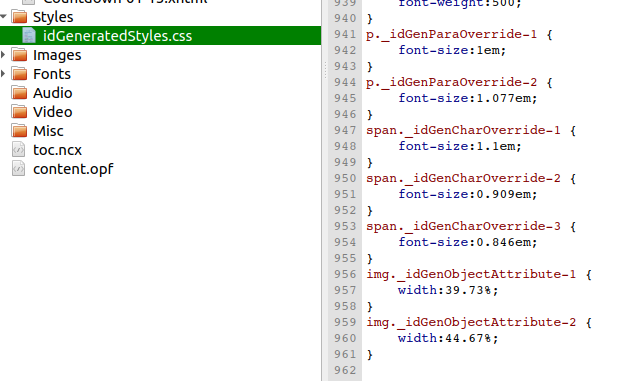
Under the STYLES tab we can see the style definition files that were given to the various parts of the book. If there is a file with a name in the style of "idGeneratedStyles", we can conclude from this that this book came directly from InDesign and did not undergo professional production by digital experts.
You will be able to notice, in the contents of this file, definitions with names beginning with "idGen_" (created by InDesign) and size and color definitions - something that is prohibited under the industry's usage recommendations and harms display on standards-compliant reading systems.
In professional production, the producing software house uses style definitions written by hand, taking into account the needs of the specific book and the requirements of the reading apps. In such a case, a custom style file belonging to the book's producer will appear here, with a minimal number of style definitions suited to this book alone.

Checking an internal chapter's code
Let's open one of the chapters in the book and view its structural code.
A valid structure will contain a body tag and, immediately beneath it, paragraph tags (p) and additional content such as images. In files that came from an InDesign export, we will see a "wrapper" div tag enclosing the internal content of our chapter.
In many cases we will see content templates divided at the word and even the letter level - which creates a heavy load on reading systems, can cause the reading app to crash, and at best only harms the user experience. Further explanation of this production problem can be read here.
Checking footnotes in a standards-compliant app
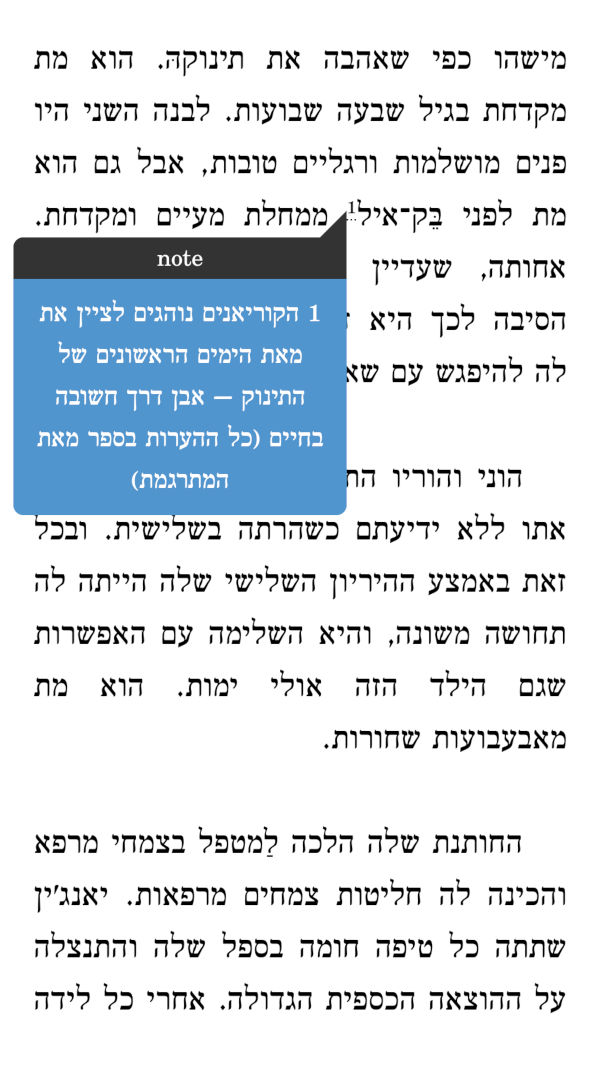
If the book has footnotes, check whether the footnote reference opens in a window over the text, or whether the user "jumps" between the reference and the note located at the end of the chapter.
In EPUB3 books displayed on standards-compliant apps such as Sifriapp, footnotes will appear in a window over the book's text, with no need to "jump" to another location in the book.
Note - in books produced before 2016, or in especially long footnotes, footnotes may have been deliberately set up with a "jump" to the content rather than in a separate window. Choose the behavior you prefer with your production manager.
Reading on Kindle
For several months now, Amazon has allowed valid EPUB3 books to be transferred to a Kindle account for reading on a Kindle device.
Old books, or ones that did not undergo quality production, are blocked from this service by Amazon!
We have received several reports of books that reached the Kindle but were missing information, had a garbled cover, or could not be read at all.
This is another reason why it is important to have quality production done by professionals!